


There are few tricks available to speedup your firefox web browser significantly. Just give it a try by following some steps below:
1. key in 'about:config' in the firefox address bar
2. then navigate to below 'Preference Name' and set the value as per recommended-
network.http.pipelining (true)
network.http.proxy.pipelining (true)
network.http.pipelining.maxrequests (8)
network.dns.disableIPv6 (true)
plugin.expose_full_path (true)
OK, now try your firefox's performance. It should be much more faster in loading pages. Hope this helpful to you.
Showing posts with label Tips. Show all posts
Showing posts with label Tips. Show all posts
Gmail Keyboard Shortcuts
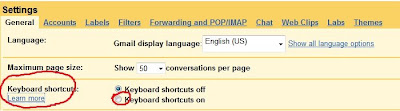
Ever want to speedup your writing when you compose an email in gmail ? Gmail keyboard shortcuts will enable to compose email without using a mouse. But before you can use the gmail keyboard shortcuts, you need to turn on the setting in gmail. First, you go to gmail's setting page, then look for 'keyboard shortcuts' and turn it on. Now, you are ready to use the shortcut keys.
Here are some common used shortcut keys:
c - compose
n - move your cursor to next message
p - move your cursor to previous message
r - reply to message sender
f - forward an email
z - undo your previous action
? - display keyboard shortcut help menu

Here are some common used shortcut keys:
c - compose
n - move your cursor to next message
p - move your cursor to previous message
r - reply to message sender
f - forward an email
z - undo your previous action
? - display keyboard shortcut help menu
Ping Your Blog, Promote Your Blog

There are many ways to promote your blogs. One of them is to PING your blog. The purpose of ping is to notify search engines that there is an update to your blogs. Ping is a mechanism by which a weblog notifies a server that its content has been updated.
List of free services that you can use to ping your blog:
ping-o-matic
ping.sg/
king ping
google blog search ping service
Disable Read & Write to USB diskdrive/pendrive
In response to query from Bojovic based on my previous post Disable Write to USB Drive Harddisk & Pendrive
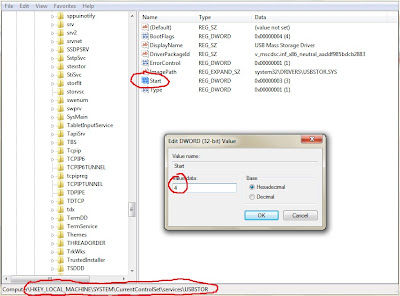
Below are steps to totally disable the use of USB harddrive and pendrive from your computer.
1) run the regedit
2) Navigate to the following registry key:

Below are steps to totally disable the use of USB harddrive and pendrive from your computer.
1) run the regedit
2) Navigate to the following registry key:
HKEY_LOCAL_MACHINE\SYSTEM\CurrentControlSet\Services\USBSTOR
3) then locate for name 'start', type 'REG_DWORD' and set the value to 4
note: if later you decide to allow the use of USB harddrive and pendrive, just set the 'REG_DWORD' value to 3.
How to Snoop into Google Security Cameras
Try below keywords in Google search for hacking into Google's security cameras.
1) inurl:"ViewerFrame?Mode=
2) intitle:Axis 2400 video server
3) inurl:/view.shtml
4) intitle:"Live View / - AXIS" | inurl:view/view.shtml^
After the search, open the search result in new web browser, then you can take control of the camera.
You can try below url:
1) http://125.206.34.118/cgi-bin/ViewerFrame?Mode=Motion&Resolution=640x480&Quality=Motion&Interval=10&Size=STD&PresetOperation=Move&Language=0
2) http://www.cherrytreeinn.com:8080/ViewerFrame?Mode=Motion&Language=0
3) http://24.39.100.161:82/ViewerFrame?Mode=Motion&Language=1
4) http://129.125.136.20/view/index.shtml
Enjoy!
1) inurl:"ViewerFrame?Mode=
2) intitle:Axis 2400 video server
3) inurl:/view.shtml
4) intitle:"Live View / - AXIS" | inurl:view/view.shtml^
After the search, open the search result in new web browser, then you can take control of the camera.
You can try below url:
1) http://125.206.34.118/cgi-bin/ViewerFrame?Mode=Motion&Resolution=640x480&Quality=Motion&Interval=10&Size=STD&PresetOperation=Move&Language=0
2) http://www.cherrytreeinn.com:8080/ViewerFrame?Mode=Motion&Language=0
3) http://24.39.100.161:82/ViewerFrame?Mode=Motion&Language=1
4) http://129.125.136.20/view/index.shtml
Enjoy!
Open Source Proxy Server
Do you know that you can setup your own proxy server on Google App Engine with GAppProxy for FREE. GAppProxy is written in Python and run on the Google App Engine. The greatest advantage of the application is you do not need a dedicated server and the speed is very fast.
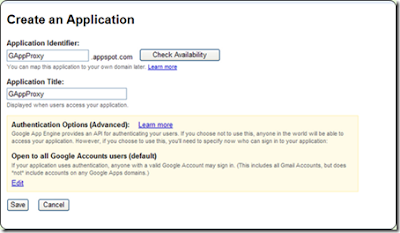

Before begin, you must register a Google App Engine account and create an application as GAppProxy. Then go to http://code.google.com/p/gappproxy/downloads/list to download GAppProxy, run gui.exe, configure your web browser with HTTP proxy set to 127.0.0.1:8000. Now, you can access the internet via the proxy server.
Disable Write to USB drive Harddisk & Pendrive
Nowadays USB port & pendrive become very common. It creates security concern for large organizations that anyone can simply plug-in a pendrive or USB harddisk to steal the corporate data.
In fact there is a registry hack that can disable the read/write access to USB devices altogether. User cannot copy data to the USB disk storage, nor able to read any files and documents from the USB drive.

But, if you only want to disallow write access and allow read access, then there is another registry hack of WriteProtect in StorageDevicePolicies registry key that you can make use of. Just follow below few steps:
1) run the regedit
2) Navigate to the following registry key:

In fact there is a registry hack that can disable the read/write access to USB devices altogether. User cannot copy data to the USB disk storage, nor able to read any files and documents from the USB drive.

But, if you only want to disallow write access and allow read access, then there is another registry hack of WriteProtect in StorageDevicePolicies registry key that you can make use of. Just follow below few steps:
1) run the regedit
2) Navigate to the following registry key:
HKEY_LOCAL_MACHINE\SYSTEM\CurrentControlSet\Control
3) Create a New Key named as StorageDevicePolicies
4) Highlight StorageDevicePolicies, and then create a New DWORD (32-bit) Value named as WriteProtect
5) Double click on WriteProtect, and set its value data to 1.

Subscribe to:
Posts (Atom)


